Moving from Lexware Office
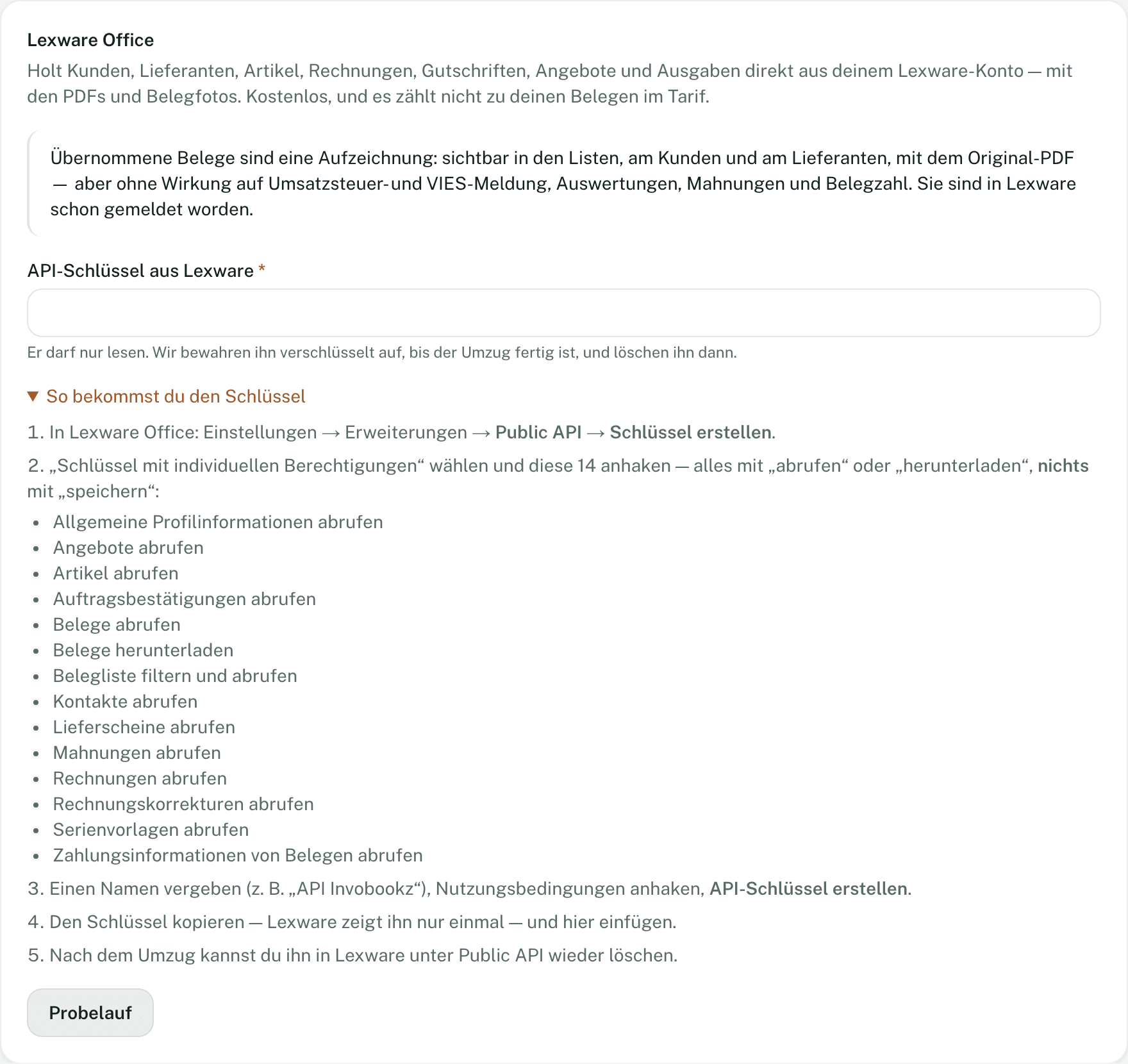
Bring customers, suppliers, items, invoices, credit notes, quotes and expenses with their PDFs into Invobookz — with an API key that can only read.
Last checked against the program: 09/10/2026
What you need
Invobookz needs an API key from your Lexware account. With it, Invobookz can only read your data. Nothing changes in Lexware.
The move is free and does not count towards the documents in your plan.
According to Lexware, the Public API is only available in Lexware Office XL, and the key is created by the account administrator. With a smaller Lexware plan, the way is via CSV files (Settings → Import → CSV files).
Create the key in Lexware
Lexware Office is in German; the labels below are as Lexware shows them.
- Sign in to Lexware Office.
- Open Einstellungen → Erweiterungen → Public API (Settings → Extensions → Public API) — directly: app.lexware.de/addons/public-api.
- Click API-Schlüssel erstellen (create API key).
- Choose „Schlüssel mit individuellen Berechtigungen (für Experten)“ (key with individual permissions) and click Weiter (next).
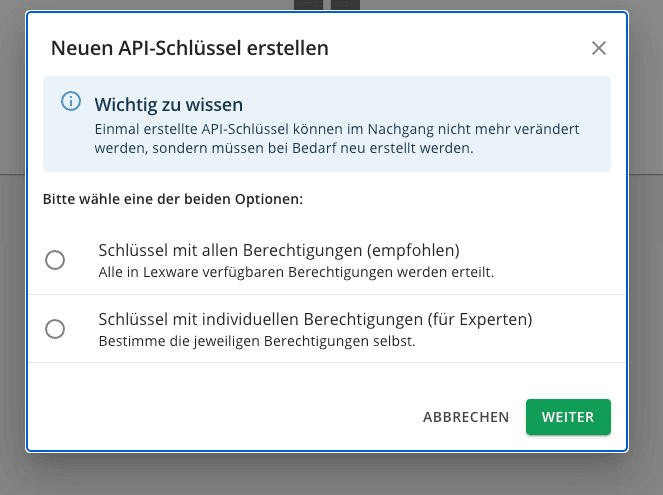
A key with “all permissions” could also change data in Lexware. Invobookz does not need that — so you only choose what is read.
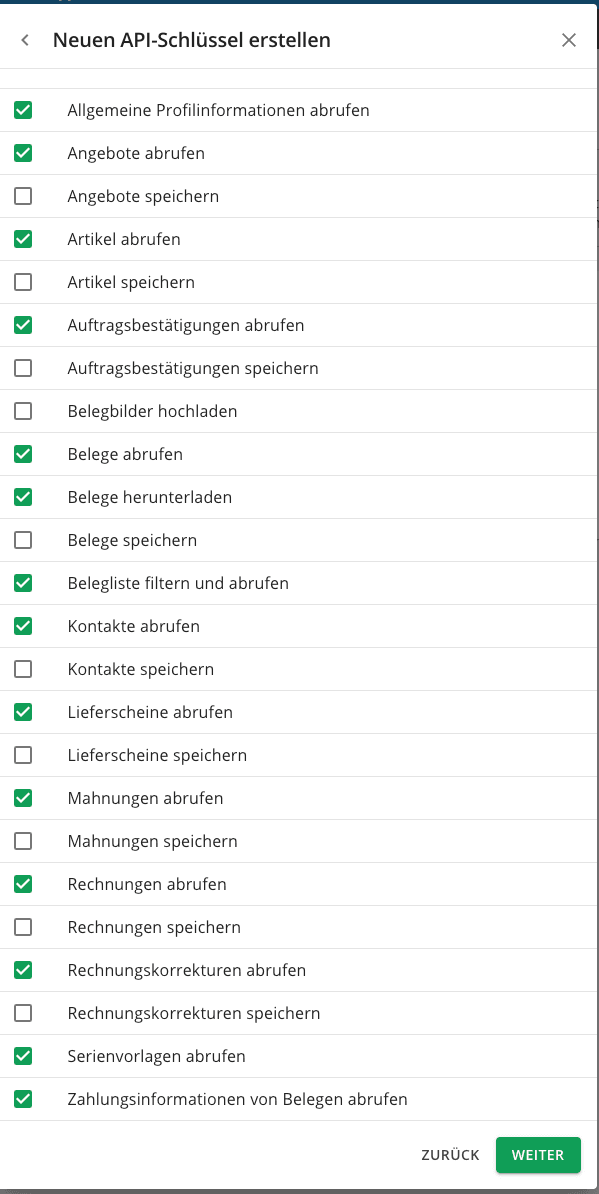
Tick every read permission
Tick every line with “abrufen” (retrieve) or “herunterladen” (download) — 14 ticks:
| Tick | What Invobookz needs it for |
|---|---|
| Allgemeine Profilinformationen abrufen | your company, tax type, small business yes/no |
| Angebote abrufen | your quotes |
| Artikel abrufen | your items and services |
| Auftragsbestätigungen abrufen | your order confirmations |
| Belege abrufen | your expense receipts |
| Belege herunterladen | the PDFs and photos of all documents |
| Belegliste filtern und abrufen | the list of all documents, so nothing is missing |
| Kontakte abrufen | customers and suppliers |
| Lieferscheine abrufen | your delivery notes |
| Mahnungen abrufen | your payment reminders |
| Rechnungen abrufen | your invoices |
| Rechnungskorrekturen abrufen | credit notes (“Rechnungskorrektur” in Lexware) |
| Serienvorlagen abrufen | recurring invoices |
| Zahlungsinformationen von Belegen abrufen | whether and when it was paid |
Do not tick: anything with “speichern” (save) or “Belegbilder hochladen” (upload receipt images). Those would let the key write to Lexware — Invobookz only reads.
Name it and confirm
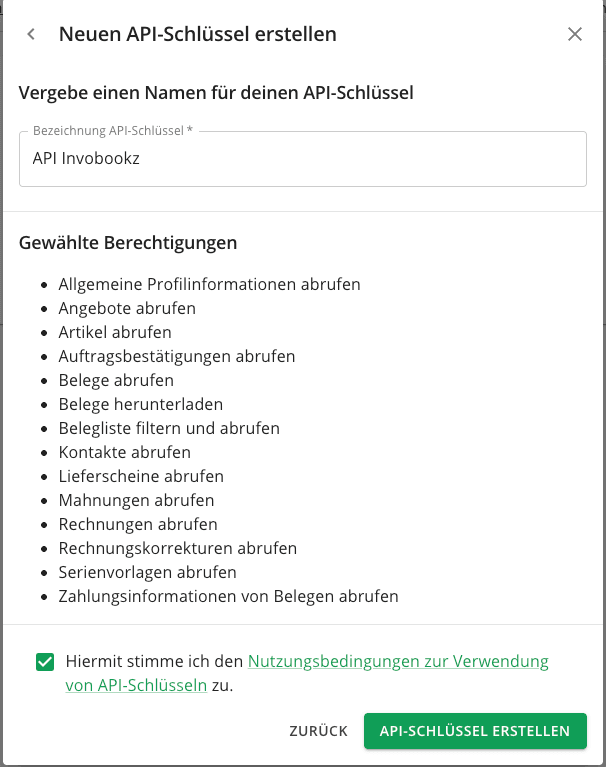
Give the key a name you will recognise later, for example “API Invobookz”. Below it you see the 14 chosen permissions again — none of them may say “speichern”. Accept the terms of use and click API-Schlüssel erstellen (create API key).
Copy the key
Lexware shows the key only once. Click the copy icon on the right of the field and paste it into Invobookz before you click Fenster schließen (close window).
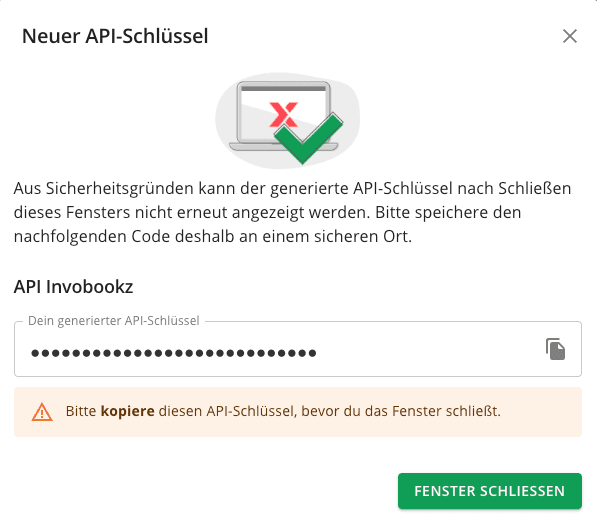
Do not send the key to anyone by email or chat, and do not take a screenshot of it — whoever has it can read your Lexware data. If it is lost, simply create a new one in Lexware.
Paste it into Invobookz and move
In Invobookz, open Settings → Import → Lexware Office.
- Paste the key into the field API key from Lexware.
- Click Dry run. Invobookz only reads the lists in Lexware and shows what would come in and what is already there. Nothing is saved.
- Choose the service type for imported items. Lexware has no service types; the VAT of your future invoices depends on it. You can change it per item later.
- Click Start the move. A bar shows the progress — with many documents it takes a while, because Lexware allows only two requests per second. If you close the page, the move waits for you with Continue next time.
- Done: Invobookz deletes the key. Delete it in Lexware under Public API as well.
What comes across — and how
- Customers, suppliers, items. What you already have (same VAT number, same customer number and name, or same name) is recognised and left unchanged.
- Invoices, credit notes, quotes with the original PDF from Lexware; payment reminders as PDFs on the invoice. Cancelled invoices come in as “cancelled”.
- Expenses with the uploaded receipt (PDF or photo). The Lexware category goes into the note.
- Not imported: drafts, delivery notes, order confirmations, income receipts without an invoice — and recurring invoices. Set those up again in Invobookz and end them in Lexware, so no invoice goes out twice.
Imported documents are a record. They appear in the lists, on the customer and the supplier — but they go into no VAT or VIES return, no report, no reminder, and they do not count towards the documents in your plan. They were already filed from Lexware. That is why an imported invoice is not sent, chased or cancelled in Invobookz.
Importing twice does no harm: what is already there is recognised and not created again, and nothing in Invobookz is overwritten. The files use storage space.
Not found what you are looking for? In Invobookz, click Support at the bottom left — we answer in the app.